Home / Services / Web Apps & Custom Tools / Online Payments
Online payments
Online payments, built into your website.
A Pay Online page in your website’s design, so clients can pay a deposit, retainer or balance the moment they decide. Card, Apple Pay and Google Pay with Stripe, or GCash and Maya with PayMongo, always in your name.
Providers
Stripe · PayMongo
Clients pay with
Cards, Apple Pay, Google Pay, GCash, Maya
Design
Your website, your brand
Accounts
Always in your name
Why it matters
People decide in the evening. Let them act on it.
Most clients make up their minds outside office hours: a couple on the sofa after reading your collections page, a family comparing venues on a Sunday night. If the next step is “we’ll send an invoice tomorrow”, their decision has to survive until you are back at your desk. A payment page turns that moment into a confirmed booking, and the receipt arrives before they put the phone down.
What we build
Everything between “yes” and “booked.”
Pay Online page
A page in your main menu with a clear button for each payment: deposit, retainer, balance or fixed-price services, written in your clients’ words.
Secure checkout
Clients pay on the provider’s encrypted checkout, so card details never touch your website.
Receipts and notifications
An acknowledgement email for the client and a notification for you after every payment, with the amount, date and a reference number.
Demo mode first
A clearly labelled demo checkout so you can try the whole experience before any real money moves.
Deposits and balances
Invoices with due dates and reminders for the balance, so you are not chasing payments weeks before the event.
Custom booking flow
For busier businesses: choose a package, sign the agreement online and pay the deposit in one visit, on your own website and without a monthly booking subscription.
In practice
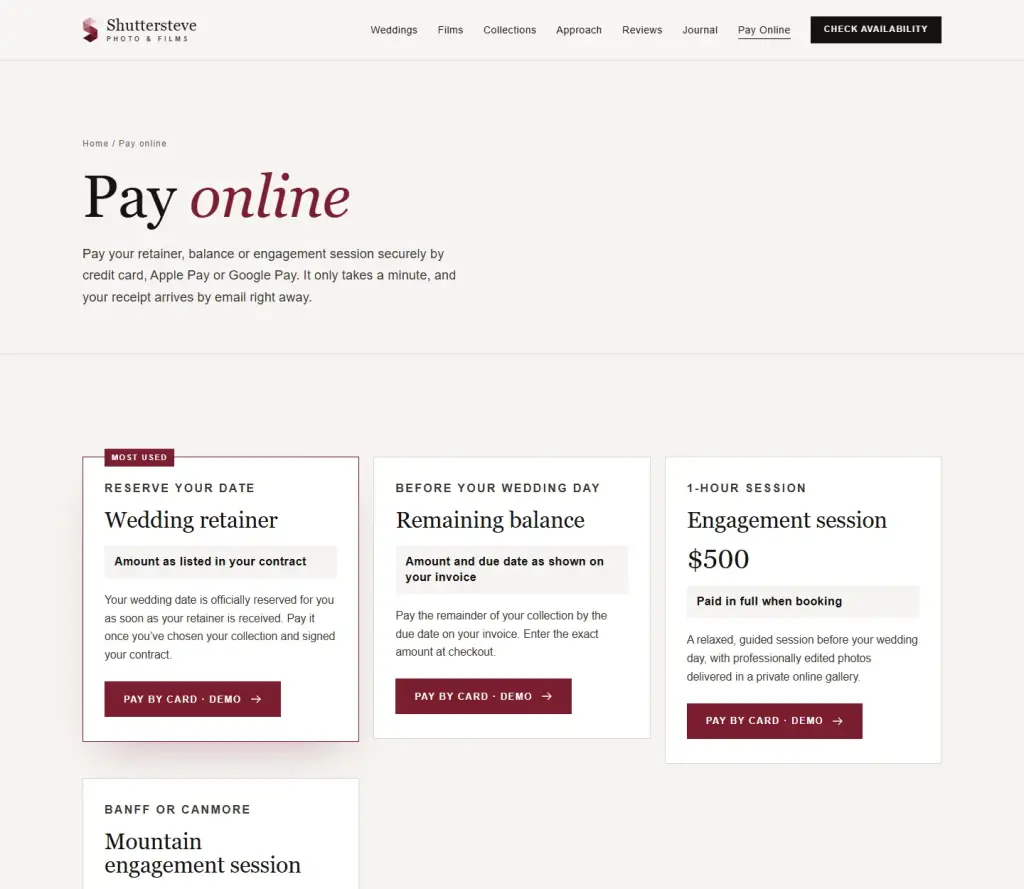
Shuttersteve: retainers paid in a minute.
For a Calgary and Banff wedding photo and film team, we added a Pay Online page to their redesigned website: wedding retainer, remaining balance and two engagement sessions, by card, Apple Pay or Google Pay. Couples get a receipt by email and the studio is notified at the same moment.
Providers
Built for where your business is.
Canada, US and Australia: Stripe
Cards, Apple Pay and Google Pay, payment links and invoices. No monthly fee, a card fee per payment.
Philippines: PayMongo
Cards, GCash, Maya, GrabPay and online banking, the methods Filipino clients expect. Stripe does not currently accept businesses based in the Philippines. How it works.
Already using a client tool?
If HoneyBook, Dubsado, Pixieset or Square already works for you, we link your website to it instead of building something new. Compare the options.
Providers set their own fees and payment methods; we confirm the current ones with you before setup. In the Philippines, a payment confirmation does not replace your BIR-registered invoice.
How we work
Tested as your client before day one.
1. Decide what clients pay
Deposit, retainer, balance or fixed prices, and the words each button should use.
2. You open the account
You create the Stripe or PayMongo account in your business name, with payouts to your bank, and invite us as a team member.
3. We design and connect
The Pay Online page is built in your website’s style and connected to your account.
4. Demo, then live
You walk through a labelled demo checkout and check both receipt emails. Then we switch on real payments.
5. Hand-over
A short guide to finding payments, refunds and receipts in your provider’s dashboard and app.
The ten checks we work through are in our website payment page checklist.
Our promises
What we commit to, and what we won’t do.
We commit to
- Payment accounts are opened in your name, with payouts to your bank.
- Card details stay with the payment provider, never on your website.
- You test the full experience before any real payment.
- We explain current provider fees before setup.
We won’t
- Hold your money or route payments through our accounts.
- Ask for your payment account password.
- Store your clients’ card numbers.
- Promise more bookings or revenue.
Questions
Frequently asked.
Do my clients’ card details touch my website?
No. Clients pay on the payment provider’s secure checkout page. Your website links to that checkout, so it never receives or stores card numbers.
Is there a monthly fee?
Not for payment pages themselves. Providers such as Stripe and PayMongo charge a fee per payment, which depends on the payment method. Booking software such as HoneyBook has a monthly subscription; a payment page or custom booking flow on your own website does not. We confirm the current fees with you before setup.
Can clients pay with GCash or Maya?
Yes, for businesses based in the Philippines. We connect your payment page to PayMongo, which supports cards, GCash, Maya and online banking. Stripe does not currently accept businesses based in the Philippines.
Can I see it before real payments start?
Yes. We set up a clearly labelled demo checkout first, so you can try the whole experience, from choosing a payment to receiving the receipt, without any money changing hands.
Who owns the payment account and the money?
You do. You open the payment account in your own name and payouts go to your business bank account. We never hold your funds, and we work through the provider’s team invitations rather than asking for your password.
We already use HoneyBook, Dubsado or Square. Can you work with that?
Yes. If your current tool already handles contracts and payments well, we link your website to it instead of building something new. We only recommend a custom payment page or booking flow when it solves a real problem.
Guides
Plan your payment page with a clearer brief.
Start here
Let clients pay the moment they decide.
Tell us what your clients pay for, where your business is registered and the tools you already use. We will recommend the simplest setup that works.