
It is 10:47 on a Tuesday night. A couple has spent the evening reading your collections page on the sofa, phone passed back and forth, and they have decided: you are the team they want. They are excited, and they want to lock in the date right now. What happens next on your website decides whether that excitement turns into a booking tonight or into an email you answer tomorrow.
This guide compares the ways a wedding photographer or film studio can take retainers and balances online, what each costs, and where each fits. It is part of our guide to online payments built into your website.
Why the payment step matters
Couples usually book in two moves: a retainer that reserves the date, then the balance before the wedding. The first payment is the moment of commitment. If the only next step is “we’ll send you an invoice”, a decision made late in the evening has to survive until the next working day. A clear way to pay the retainer online lets the couple act while they are still sure.
The balance matters too. A payment page with the amount and due date already explained saves the back-and-forth of bank details and reminders a few weeks before the wedding.
The card fee is roughly the same everywhere
Whichever tool you choose, card payments usually cost around 3% per payment. On $100,000 of bookings in a year, that is roughly $3,000 in fees, whether you use Stripe, HoneyBook, Square or Pixieset. The real differences are monthly subscriptions, setup time and how much of the booking process the tool handles. Many Canadian couples are also happy to pay by Interac e-Transfer, which costs nothing, so offering both is often the sensible choice. Check each provider’s current rates before you decide.
Option 1: Payment links on your website
What it does: a “Pay Online” page on your own site with a button for each payment: retainer, balance and fixed-price sessions. Each button opens a secure checkout run by a provider such as Stripe.
Cost: no monthly fee, only the card fee per payment.
Best for: studios that already handle contracts their own way and want couples to pay by card, Apple Pay or Google Pay.
Trade-off: payment links take money; they do not send contracts or run a payment schedule on their own.
Option 2: All-in-one client software
HoneyBook, Dubsado and Pixieset Studio Manager combine inquiries, proposals, e-signed contracts, invoices, payment schedules and reminders.
Cost: a monthly subscription, from free starter plans to well over $100 a month, plus card fees.
Best for: busy studios that want automation and are happy to work inside the software.
Trade-off: the monthly cost, and the couple’s booking experience happens on the software’s pages rather than your own website.
Option 3: A custom booking flow on your own website
The couple chooses a collection, signs your contract online and pays the retainer in one visit; the balance invoice and reminders then go out automatically before the date.
Cost: a one-time build, then only card fees.
Best for: studios that want booking to feel as considered as the rest of their website, without a monthly subscription.
Trade-off: it is built for you, so changes such as new collections or contract updates go through your developer.
In practice: the Shuttersteve website
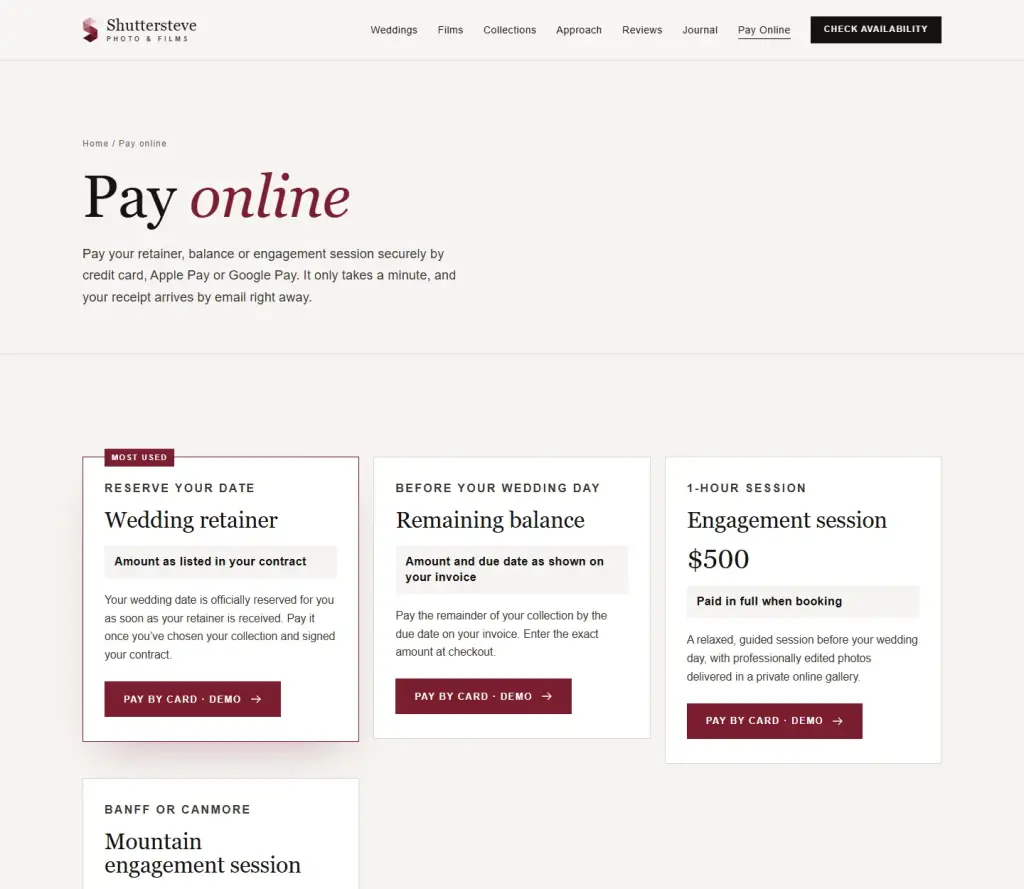
For Shuttersteve Photo & Films, a Calgary and Banff wedding photo and film team, we added a Pay Online page to the redesigned site, reachable from the main menu. Couples can pay the wedding retainer, the remaining balance, an engagement session or a mountain engagement session by card, Apple Pay or Google Pay. After paying, the couple gets an acknowledgement receipt by email and the studio is notified at the same moment.
Before any real payment, a clearly labelled demo checkout let the studio walk through the whole experience. The steps we checked are in our payment page checklist.
Which option should you choose?
- Fewer than about 30 weddings a year, with your own contract: start with payment links; add a booking flow later if you want it.
- Many weddings and a lot of admin: all-in-one software can save hours each week.
- A premium brand and no monthly fees: a custom booking flow on your own site.
Planning online payments for your studio?
We design the Pay Online page in your website’s style and connect it to a payment account in your name. Read how we approach online payments for your website, or tell us about your studio.
Frequently asked questions
Is Stripe safe for my clients?
Yes. Couples enter their card on Stripe’s encrypted checkout, and your website never stores card details.
Can couples pay in instalments?
Yes: a retainer to book, then the balance before the wedding. Invoices with due dates and reminders keep this simple for both sides.
What if my studio is in the Philippines?
Stripe does not currently accept businesses based in the Philippines. Read how to accept GCash, Maya and cards on your website with PayMongo.