Home / Work / Avelora Care Connect
Web app · Automation · Canada
Avelora Care Connect: closing the care gap.
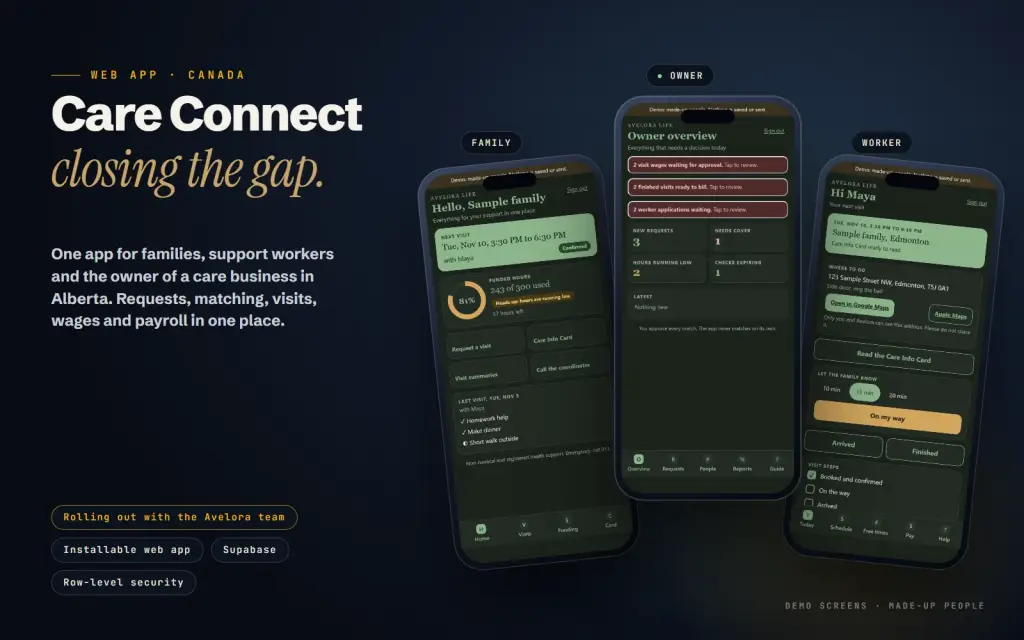
We designed and built a care-coordination web app for Avelora Life, a non-medical support provider in Alberta, Canada. Families, support workers and the owner each get their own screens, and the paperwork between a request and a paid worker runs by itself.
Client
Avelora Life, Alberta, Canada
Product
Installable web app for phones
Built with
JavaScript · Supabase · Cloudflare
Status
Rolling out with the Avelora team
The story
Thursday, 3:30 PM. A family is waiting.
A mother has arranged her week around a three-hour respite visit for her son. At two o’clock, the support worker messages: they cannot make it. Somewhere, a coordinator starts working through a list. Who is free? Who has a current police check? Who works in that city, and who is already booked across town?
That is the gap in home and community support. It is rarely a lack of good people. It is the distance between a family’s need and a cleared worker at the door, and then between a finished visit, a correct invoice and a worker paid on time. Most of it lives in phone calls, spreadsheets and memory.
Avelora Life had already worked with us on their website and local search. Families were finding them. The next step was to make the work behind the website as clear as the website itself. So we built Care Connect: one app where each person sees only what they need, the rules are enforced every time, and the owner keeps every decision that matters.
The gaps we set out to close
Four gaps. One app.
Each one used to depend on someone remembering. Now the app does the remembering and the owner makes the call.
Gap 01
Between a need and a person at the door
BeforeA family calls. Someone has to check who is free, who is cleared, who lives in the right city and who is not already booked.
With Care ConnectThe app ranks only cleared, free workers with no clash, and the owner approves in one tap.
Gap 02
Between a cancelled visit and cover
BeforeA worker cannot make it. The scramble starts: calls, texts, apologies to the family.
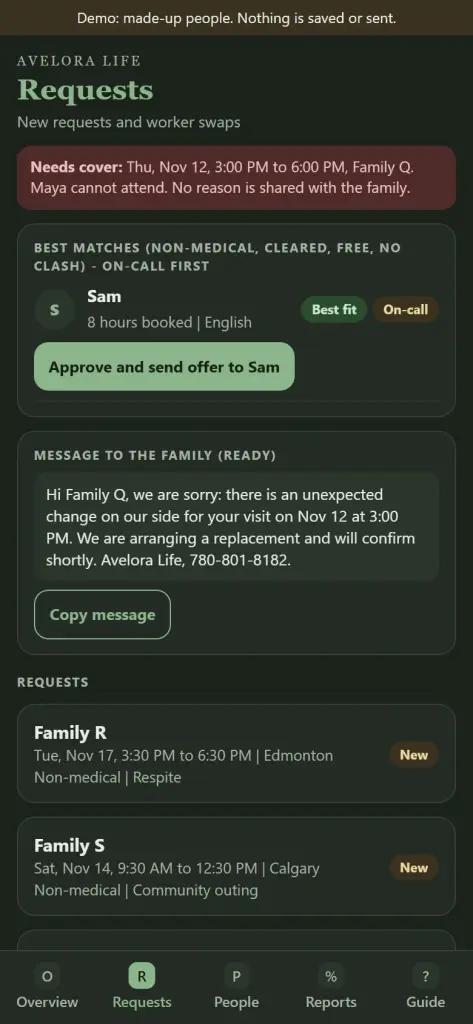
With Care ConnectThe worker hands the visit back in the app. On-call workers are suggested first, and a message to the family is ready to send.
Gap 03
Between a finished visit and a paid worker
BeforeHours are written down, added up, checked against the schedule, then paid. Weeks can pass.
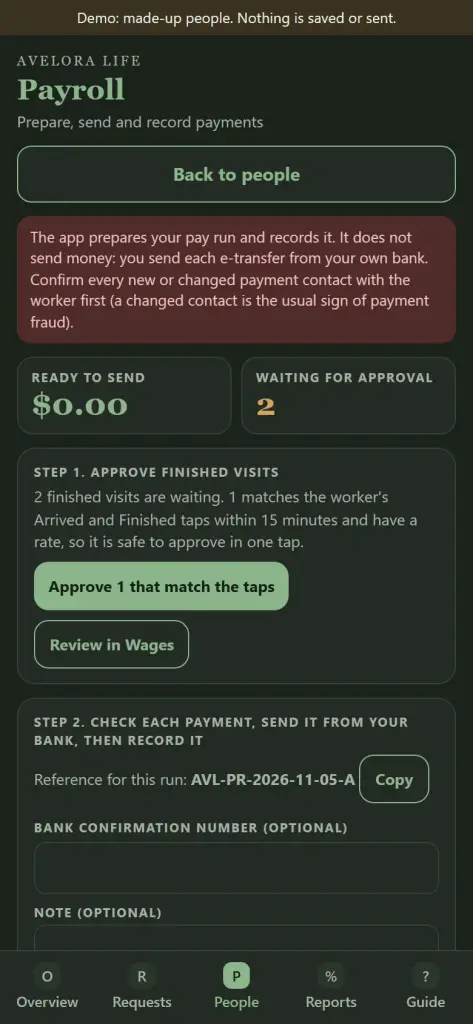
With Care ConnectWages appear the moment a visit is finished, are checked against the real taps, and payroll warns before the pay deadline.
Gap 04
Between program money and payday
BeforeFunding programs can pay late, and the money in and the money out are mixed together.
With Care ConnectInvoices and wages are tracked separately, so a worker’s pay never waits for a program, and the gap is visible on one screen.
How it works
One visit, start to finish.
A simplified walkthrough with made-up people. Gold steps need a person. Green steps run by themselves.
- 01Family
A family asks for support
Date, time, city and the kind of help. No health details are collected.
- 02App
The app finds who is free and cleared
It checks free times, city, the type of work, double bookings and each worker’s checks. Anyone not cleared is never suggested.
- 03Owner
The owner approves the match
Nothing is matched on its own. One tap sends the offer, and the worker accepts in the app.
- 04Worker
The visit is tracked, step by step
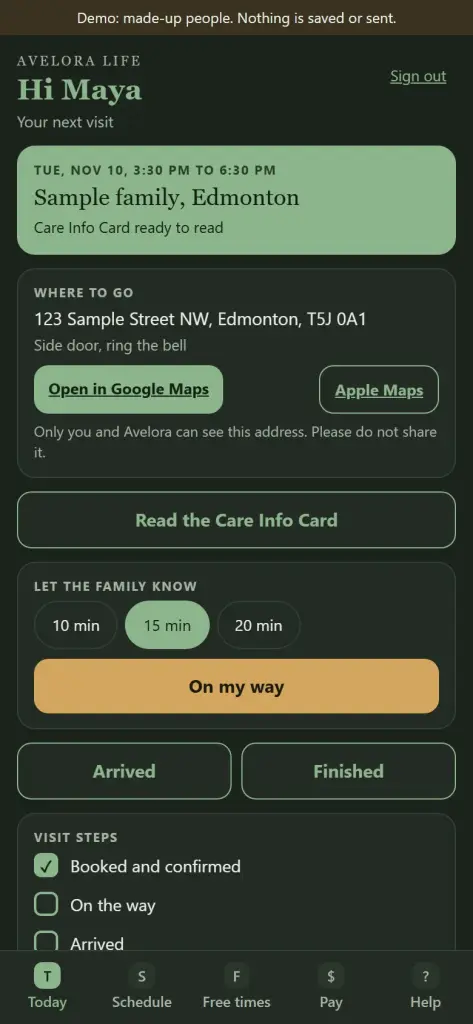
On my way, Arrived, Finished. Each tap is time-stamped and the family gets a short summary. No location is tracked.
- 05App
Wages and charges create themselves
Hours are checked against the real taps. Visits within 15 minutes of the schedule can be approved in one tap.
- 06Owner
Payroll is recorded, everyone is told
The owner sends each e-transfer from their own bank. The app records the pay run and tells every worker.
Three people, three screens
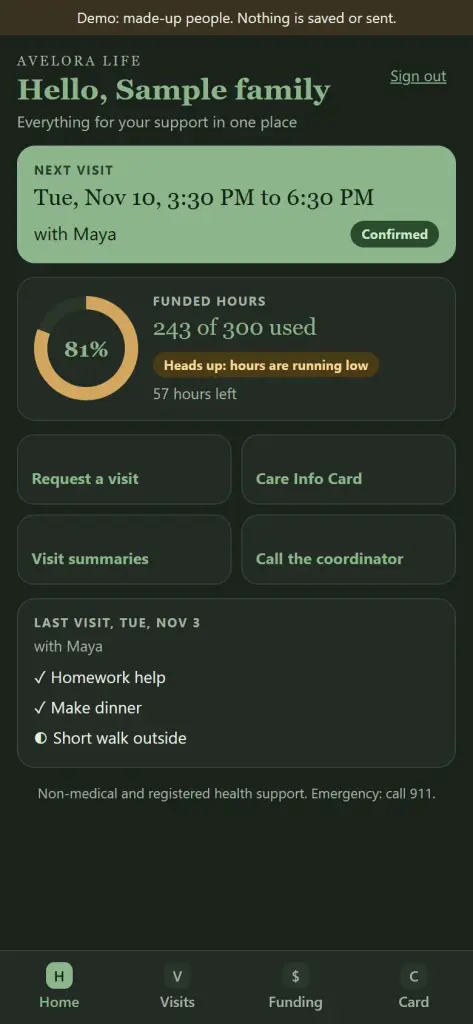
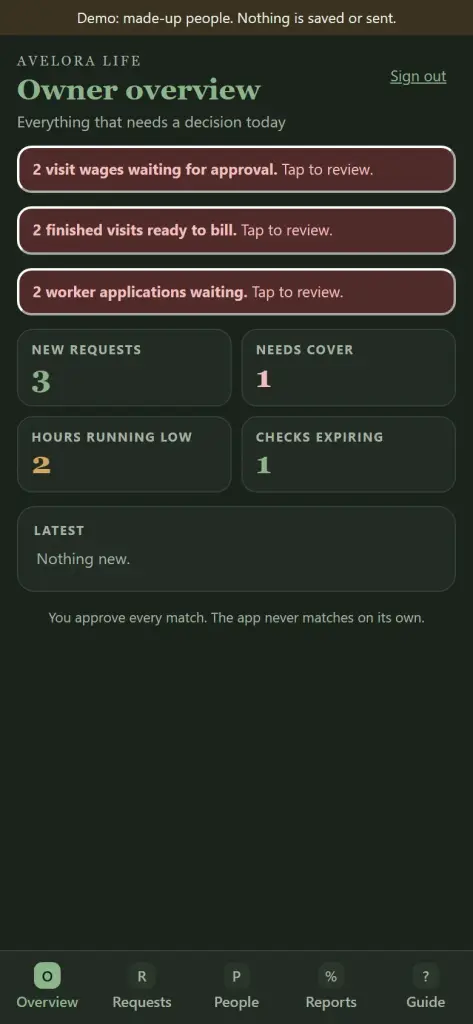
Everyone sees only their part.
Real screens from the public demo. The demo uses made-up people, and nothing in it is saved or sent.
Automation
The app does the paperwork. The owner keeps the decisions.
Runs by itself
- Matching suggestionsRanked by free time, city, type of work, clashes and current checks.
- Wages and chargesCreated the moment a visit is finished, from each worker’s rate and the family’s funding rate.
- Time checksArrived and Finished taps are compared with the booking. A gap of 15 minutes or more is flagged.
- Alerts that matterPay to approve, visits to bill, cover needed, hours running low, checks about to expire.
- NoticesWorkers and families are told about offers, recorded payments and confirmed payment contacts.
- Pay deadlinesPayroll warns when a visit is 7 days old and again past 10 days.
- Privacy clean-upOld applications, enquiries and unused addresses are listed for review. Nothing is deleted until the owner taps.
Always a person
- Who gets each visitEvery match is approved by the owner.
- Approving the moneyWages, charges and any change to hours or rates.
- Sending paymentsThe app never moves money and never stores bank account numbers.
- New payment contactsChecked with the worker first, the usual way payment fraud is stopped.
- Adding people and checksReferences, police checks and registrations are recorded after they are seen.
Small things, big problems prevented
Built for the moments that usually slip.
Funded hours, watched
Families and the owner see hours used. Warnings appear at 75% and 90%, before a program’s hours run out.
Checks that expire, flagged
Workers without two references and a police check with vulnerable sector search are never suggested. Expiring checks show up early.
Money in, money out, apart
Invoices turn to Paid in full when paid. Wages are paid on the worker’s schedule. One screen shows the gap between the two.
More screens
Matching and payroll, up close.
Under the hood
Care data deserves serious engineering.
Each person sees only their own
Row-level security on every database table. A family never sees a worker’s phone or address, and a worker sees a visit address only when booked.
Rules enforced by the database
Uncleared workers cannot be offered a visit, steps happen in order, and only the owner can send offers, even if someone tries to bypass the app.
Locked-down by default
A strict Content-Security-Policy, the database library served from Avelora’s own site, and no rights at all for anonymous visitors beyond the two public forms.
Tested before it was trusted
More than 500 automated checks cover the rules, the database permissions and the full visit loop, plus role-by-role tests in a real browser.
Works like an app
Installs to a phone’s home screen from the browser, works in light and dark mode, and keeps a demo mode with made-up people for training.
Hosted in Canada
The database runs in a Canadian region, and a draft privacy notice, retention schedule and breach plan were written for professional review.
Honest status
Rolling out, and saying so.
Where it is now
The app is deployed and the Avelora team is setting it up, starting with admin accounts and payroll.
Professional sign-off
Legal and accounting questions, such as worker status and tax on private-pay services, are with professionals before full launch.
Still to test
Real iPhone and Android devices, and direct printing to a receipt printer, which stays switched off until it is tested on real hardware.
Coming next
In-app messages from the owner to a worker or family, a documents and print center, invoices by email, and matching bank e-transfers to invoices.
Results
Time saved and visits covered will be published once there is real data and Avelora approves it.
Running a care or service business?
Your own app, built around how you work.
Scheduling, matching, visit tracking, invoices and payroll can live in one place. We plan it with you, build it, test it properly and keep the decisions where they belong: with you.
Automation services
Automate the work behind your service.
Reminders, invoices and connected tools for service businesses.