Home / Services / AI Solutions / Invoice automation
Automation for service businesses
Invoices, receipts and reminders with less manual chasing.
Collect documents, prepare records and send approved reminders from verified invoice status. We build the supporting workflow while your bookkeeper and accountant retain the decisions that require professional review. ARKIELLO is a Philippines-based team working remotely with businesses in the US, Canada, Australia, the UK and Europe, using agreed time-zone overlap and written handovers.
Built for
Service businesses and their finance teams
Approach
Approved rules and human hand-off
Delivery
Remote, with agreed review times
Ownership
Your accounts and documented workflows
The story
The work is finished. The paperwork is scattered.
Picture a consultant searching a phone gallery for a receipt while a colleague asks whether a client has paid. The invoice tool, inbox and spreadsheet each show part of the story.
Manual copying makes it harder to distinguish an overdue invoice from a payment still being matched. A polite reminder can become an awkward interruption if it goes to someone who already paid.
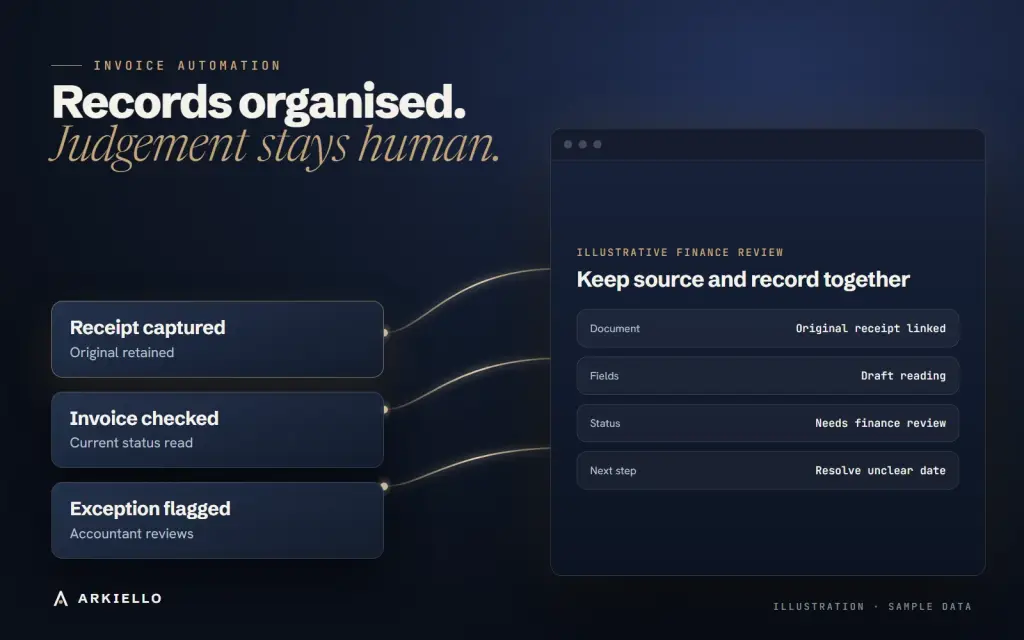
A connected workflow collects the document, reads current invoice information and prepares the next step. Unclear records go to review. Your finance team spends its attention on decisions rather than searching through attachments.
How it works
From loose documents to a reviewable record.
A proposed support workflow, not automatic accounting or tax advice. Your finance team approves records and exception handling.
Collect the source
Keep the original receipt or invoice with its reference.
Prepare the record
Extract useful fields and flag uncertainty.
Check payment status
Read current records before proposing a reminder.
Review the exception
Send disputed or unclear cases to the finance owner.
What we build
What we build.
Receipt collection
Approved upload or inbox routes with original files linked to records.
Draft field extraction
Dates, suppliers and totals prepared for review, with ambiguity visible.
Invoice event handling
Connections to supported accounting tools after current API and account checks.
Approved reminders
Polite templates governed by current status, holds and stop rules.
Review queues
Unmatched payments, duplicates and unclear documents assigned to a person.
Accountant handover
Organised exports, source links and documentation of the preparation workflow.
Proof
Demonstrated workflows, with clear limits.
Our tax-records automation is a labelled demonstration of receipt filing, draft extraction and an accountant pack, not client work or tax advice. Zerbiz is our own booking product in beta and checks signed payment events. ShutterSteve is a design-stage Pay Online example in client review; it is not evidence of live payment results.
Records demonstration
The tax-records sample flags unclear readings and leaves tax treatment to the accountant.
Verified payment events
Zerbiz checks a payment signature before confirming a booking.
Design-stage payments
The ShutterSteve review design separates payment choices and uses a labelled demo before real payments.
Who it’s for
Built for businesses like yours.
- Consultants and agencies that need invoice status and follow-up in one view.
- Studios and service teams that collect retainers and balances through separate steps.
- Bookkeepers and accountants that want organised source documents and visible exceptions.
- Owner-managed businesses that want less copying without surrendering approval.
The process
From first call to launch.
1. Discovery
We map the current process with the people who run it, including exceptions, access and the point where a person must take over.
2. Plan and prototype
You review the proposed workflow, sample messages and acceptance checks before we connect live accounts.
3. Build and test
We build in a controlled setup and test ordinary requests, missing information, duplicated events and unavailable tools with your team.
4. Launch and support
We agree a rollout window across time zones, train the owner and document support, alerts and how to pause the workflow.
Get started
What to send us to get started.
A few lines are enough. No passwords or customer records, please.
- Your invoicing and accounting tools
- Redacted examples of invoices, receipts and payment notices
- Your approved reminder wording and hold rules
- Who reviews records and disputed balances
- The handover format your accountant wants
Our standards
What we commit to, and what we won’t do.
We commit to
- Agree the scope and approval boundaries before building
- Use business-owned accounts and limited access
- Test failure paths as well as the ordinary flow
- Document ownership, alerts and handover
We won’t
- Promise business results we have not measured
- Hide exceptions behind a successful-looking screen
- Make you dependent on undocumented personal accounts
Questions
Frequently asked.
Will the automation do our accounting?
It can collect documents, prepare fields and connect approved workflows. Your bookkeeper or accountant remains responsible for review, classification and professional decisions.
Can you connect QuickBooks or Xero?
We assess the current official APIs, available connectors and your account permissions. The scope states which records and actions are supported before building.
Will reminders stop after payment?
We design checks against the agreed source of invoice status and test late or unmatched payments. A payment that has not been matched may still need human review.
Can it read every receipt correctly?
No. Faint images, unusual formats and missing information need review. We retain the original and make uncertainty visible rather than treating extraction as a verified record.
Does it file tax returns?
No. The proposed workflow prepares records and handover materials. This is not tax or legal advice, and tax treatment stays with your qualified adviser.
Who controls the accounts?
Your business controls the accounting and payment accounts. We agree limited integration access and document how to revoke or replace it.
Guides
Read before you decide.
Related
Often paired with this.
Start here
Show us the paperwork you keep copying.
Send redacted examples and your accountant’s preferred handover. We will map the preparation work and the checks that should remain human.