
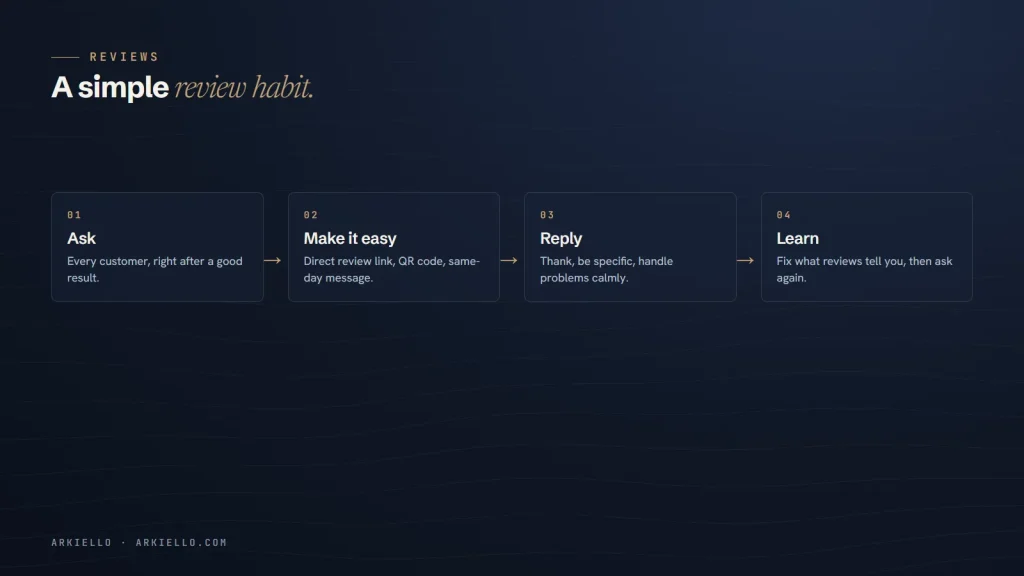
Reviews do two jobs at once. They help customers decide whether to trust you, and they are one of the signals Google uses to judge how prominent a local business is. The good news: the most effective way to get more reviews is also the simplest. Ask every happy customer, at the right moment, and make it easy.
This guide covers the rules, when and how to ask, ready-to-use messages and how to reply. It’s part of our approach to local SEO.
Why reviews matter
Google lists review count and ratings among the factors behind prominence in its explanation of how local results are ranked. Just as importantly, customers read them. A steady flow of recent, genuine reviews, with thoughtful replies, tells people that the business is active and cares.
Recency matters as much as the total. A profile with recent reviews looks like a business that is busy today, not one that was busy years ago.
The rules: what you must never do
Before asking for a single review, know where the lines are. Google’s policies on fake engagement prohibit:
- Incentives. Discounts, freebies, entries into prize draws or payment in exchange for a review.
- Review gating. Asking only happy customers, or checking satisfaction first and sending only positive customers to Google.
- Fake reviews. Reviews written by you, your staff or family, or bought from anyone.
- Conflicts of interest. Reviewing a competitor, or posting reviews about your own business.
In the United States, the Federal Trade Commission’s rule on consumer reviews and testimonials also bans fake reviews and buying reviews, and allows civil penalties. Consumer regulators in Canada and Australia have also acted against fake and misleading reviews. Breaking these rules can mean removed reviews, a suspended profile or legal trouble, so it is never worth it.
When to ask
Ask when the customer is happiest, usually right after a visible result:
- When the job is finished and the customer says thank you
- When they collect their order or leave after a great appointment
- After a project milestone they are excited about
- When they compliment you in an email or message
Ask everyone, not only the customers you expect to be delighted. It keeps you within the rules, and it gives you honest feedback.
How to make it easy
Get your review link
In your Business Profile, look for the option to ask for reviews. Google gives you a short link that opens the review form for your business directly. Save it somewhere your whole team can find it.
Turn it into a QR code
Put the link into a QR code on your counter, receipts, invoices or a card you hand over at the end of a job. Keep the message simple: “Happy with our work? A Google review helps us a lot.”
Send it the same day
A short message sent the same day gets far more responses than one sent a week later. Here are two you can adapt:
By text: “Hi Maria, thanks again for choosing us today. If you have a minute, a Google review helps other people in the area find us: [your link]. Thank you!”
By email: “Thank you for trusting us with your kitchen renovation. If you’re happy with the result, would you share a quick review on Google? It takes about a minute: [your link]. If anything wasn’t right, just reply to this email and we’ll fix it.”
Make it a habit, not a campaign
A burst of 30 reviews in one week followed by silence looks less natural than two or three every week. Build asking into how you work:
- Decide who asks: the technician, the front desk or the owner.
- Decide when: at handover, at checkout or in the follow-up email.
- Keep the link and QR code ready on every phone and counter.
- Check new reviews weekly and celebrate them with the team.
How to reply to reviews
Positive reviews
Reply within a few days. Thank the person by name, mention something specific about the job, and keep it short. A copy-paste “Thanks for your review!” on every reply looks automated.
Negative reviews
Don’t reply in anger, and don’t argue the details in public. Acknowledge the experience, apologise for what went wrong where it’s fair to, avoid sharing any private information, and offer to continue the conversation directly with a name and contact method. Many customers judge a business more by how it handles a bad review than by the review itself.
Reviews that break the rules
If a review is clearly fake, offensive or from someone who was never a customer, you can report it from your Business Profile. Google removes reviews that break its policies, not reviews that are simply negative, so reply calmly while you wait.
Reviews are one part of local SEO
Reviews work best alongside a complete, accurate Business Profile. Work through our Google Business Profile checklist, and read how Google ranks local businesses to see how reviews fit with relevance and distance.
Want a review system that runs itself?
We set up review links, QR codes, message templates and reply guidelines as part of our local SEO service. Get a free local SEO check to see where you stand.