For many local businesses, the Google Business Profile is the first thing a new customer sees, before the website, before a phone call. It shows up in Google Maps and in the local results near the top of Google, with your phone number, hours, photos and reviews in one place.
This is the checklist we use when we set up or fix a profile as part of our local SEO service. Work through it in order. Most steps take minutes; together they make the difference between a profile that sits there and one that brings in calls.
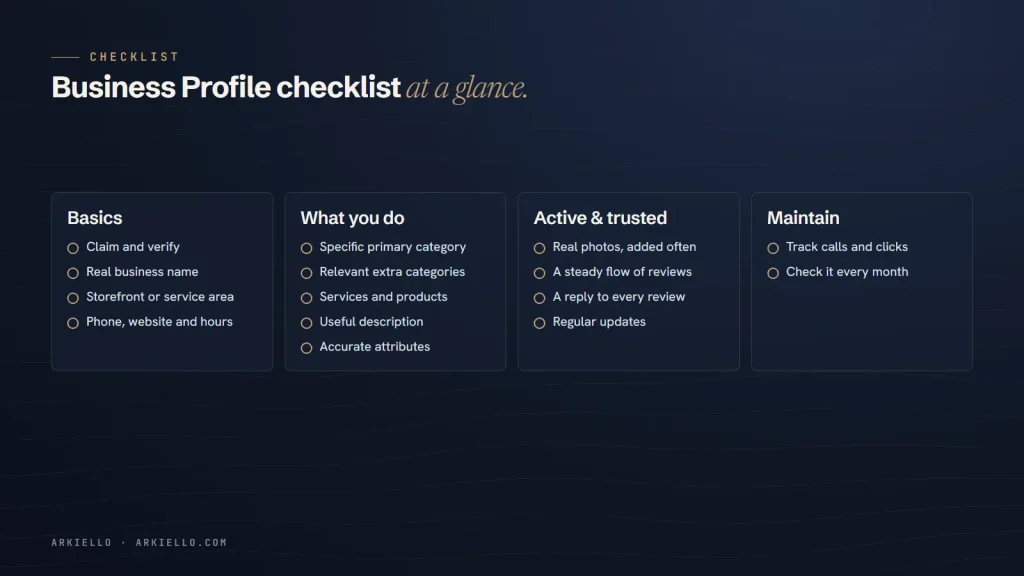
Get the basics right
1. Claim and verify your profile
Search for your business name on Google Maps. If a profile already exists, claim it rather than creating a second one. If not, create one at Google Business Profile. Google will ask you to verify that you run the business, usually by video, phone, text or email, depending on the business and region.
Keep ownership in your own name or your company’s Google account. If an agency or employee helps, add them as a manager rather than sharing your password.
2. Use your real business name
Your profile name should match the name customers see on your signage, website and paperwork. Adding keywords or locations, such as “Smith Plumbing Best Emergency Plumber Toronto”, is against Google’s guidelines for representing your business and can get a profile suspended.
3. Choose storefront or service area
If customers visit you, show your address. If you travel to customers, such as a plumber, cleaner or mobile mechanic, set your profile up as a service-area business, hide your address and list the areas you serve. Google lets you add up to 20 service areas; list the towns or regions you genuinely cover rather than an enormous radius.
4. Add phone, website and accurate hours
Use a phone number that reaches the business directly. Link to the most relevant page of your website: usually the homepage, or the location page if you have several branches. Set your regular hours, and add special hours for public holidays so customers don’t arrive to a locked door.
Tell Google what you do
5. Pick the most specific primary category
Your primary category is one of the strongest signals for which searches you appear in. Be as specific as possible: “Plumber” rather than “Contractor”, “Wedding venue” rather than “Event venue” if weddings are your main business. Look at the categories used by the businesses that already rank for your main search; they are a useful guide.
6. Add relevant additional categories
You can add up to nine additional categories. Use them for other services you genuinely offer, not for everything loosely related. Too many categories can blur what you are known for.
7. List your services and products
Add each main service with a short, plain description, and products if you sell them. This helps Google match you to more specific searches and helps customers see quickly whether you do what they need.
8. Write a useful description
You have up to 750 characters, and the first few lines matter most because they show before “More”. Say what you do, who you do it for and where, in plain language. Don’t include links, prices that change often or promotional phrases in capital letters.
9. Set the attributes that apply
Attributes are the small labels Google shows, such as wheelchair-accessible entrance, online appointments or on-site services. They vary by category and country. Select only the ones that are true; customers rely on them.
Show you’re active and trusted
10. Upload real photos, and keep adding them
Add photos of your exterior so people recognise the building, your interior, your team and your work. Real photos build far more trust than stock images. Add new ones every month or two, especially after finishing a project you are proud of.
11. Build a steady flow of reviews
Reviews are one of the clearest signals customers and Google use to judge a local business. Ask every happy customer, make it easy with a direct review link, and never offer anything in exchange. Our guide on how to get more Google reviews the right way covers when to ask, what to say and what to avoid.
12. Reply to every review
Thank people for positive reviews, and mention something specific when you can. For negative reviews, stay calm, acknowledge the problem, avoid sharing private details and offer to continue the conversation directly. Future customers read your replies as closely as the reviews themselves.
13. Publish updates
Business Profile posts let you share offers, news, events and recent work, with a photo and a button. They show customers that the business is active. A short post every week or two is plenty.
Measure and maintain
14. Track calls, clicks and direction requests
The Performance section of your Business Profile shows how many people called, visited your website or asked for directions, and which searches found you. To see profile visitors in your website analytics, add tracking parameters to your website link, for example ?utm_source=google&utm_medium=organic&utm_campaign=business-profile.
15. Check your profile every month
Anyone can suggest edits to a public profile, and Google sometimes updates details automatically. Once a month, check that your name, hours, phone, categories and website are still correct, review any suggested edits and refresh your photos and posts.
Your profile works best with your website
A complete profile is the foundation, but it isn’t the whole picture. Google also looks at how relevant and well known your business is across the web, including how your website ranks. Our guide to how Google ranks local businesses explains the three factors and what you can actually influence.
Want a second pair of eyes on your profile?
We set up and optimize Business Profiles as part of our local SEO service. Get a free local SEO check and we’ll tell you what to fix first.