Someone is ready to contact your business. Should your website ask them to describe what they need, choose a time, or make a confirmed booking?
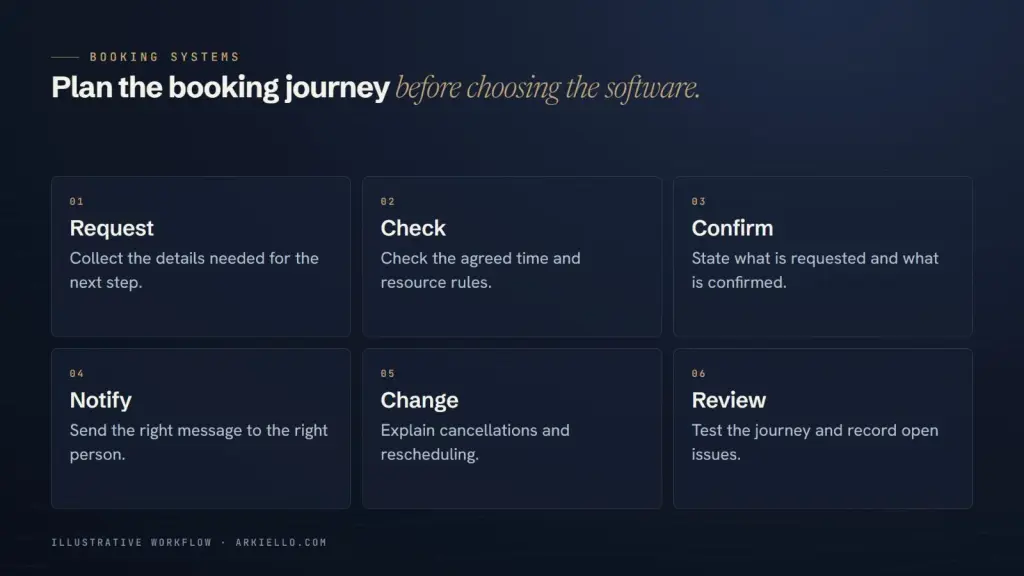
That choice affects what customers expect and what your team has to do next. Start with the decision you can honour, then choose the interface. Our booking system service plans the workflow before selecting the software.
What can a customer decide without your help?
A calendar fits a defined appointment: the visitor understands its purpose, length, location and any conditions. Your team can make the displayed time available without another conversation.
An enquiry works better when you need to establish suitability, quote for a variable service or check several resources. A preferred date can still be useful, but receiving it does not have to reserve anything.
A third option sits between them: a request for a particular time that your team must approve. Cal.com’s confirmation feature, for example, supports reviewing a requested meeting before confirming it. Check the chosen tool’s current behaviour rather than assuming every calendar works this way.
Give each button a precise promise
Before design starts, finish these sentences:
- After an enquiry, the customer has asked for a conversation. No appointment has been reserved.
- After a time request, the customer is awaiting the decision described on screen.
- After a confirmed booking, the customer has the appointment your business has agreed to provide.
If your team uses a temporary hold, define when it begins, what it blocks and when it expires. Do not label a request as confirmed because the form displayed a thank-you message.
A consultation can be bookable while the main service needs a quote
Consider a hypothetical event business. Its package depends on the event, guest count and supplier arrangements. Showing an open date would not establish that the complete event can be delivered.
The business could accept a package enquiry and separately offer a defined venue-tour appointment. The tour reserves time with the team; it does not reserve the event date. The two screens and confirmation messages should make that difference clear.
The same distinction can help a consultant offer a discovery meeting without promising to accept the later project. For venue-specific wording, our guide to venue enquiry actions addresses the different requests a venue may receive.
Can your team trust the availability?
List every place a commitment is made: your calendar, telephone bookings, messages and any other sales channel. Who enters a booking received elsewhere? Which staff member or resource must be free? Does travel or preparation need space between appointments?
Also decide what happens when the assigned person is unavailable or the business is closed. If those questions have no dependable answer yet, start with an honest request flow while you organise the calendar. Publishing more slots will not settle the operating rules.
The next decision is whether an existing booking tool can support those rules.
Keep payment and booking status separate
A customer may pay before approval, after approval or later. Choose the sequence deliberately and describe what each step achieves. A payment receipt alone should not be treated as evidence that a particular resource is available.
If payment fails, remains pending or is later refunded, what happens to the appointment? Record the answer before connecting the checkout. Our online payments service covers that related part of the project.
Try the smallest useful journey
Walk through one ordinary customer and one awkward situation with your team. Try an unavailable time, a request outside the offer and a customer who needs to change plans. Read the messages as that customer would.
Ask whether they can tell what is reserved, who acts next and how to get help. Agree how your team will identify an unhandled request. A smaller flow that matches your working process is a useful first release; more automation can follow a demonstrated need.
Use our booking proposal checklist to put those decisions into the work you commission.
Plan the right next step
Tell ARKIELLO what customers book, how you manage availability and where the process gets difficult. Include your website and current tools. We will discuss an enquiry, approval or booking flow that fits the work your team actually does.