
When you redesign a website, some page addresses almost always change. A blog moves from /blog/ to /insights/, a services page gets a cleaner URL, two thin pages are merged into one. Each of those changes breaks every link and bookmark that pointed to the old address, unless you add a redirect.
This guide explains how to build a complete 301 redirect map, which URLs need one, and how to test them. It is part of our approach to website redesigns that keep your Google rankings.
What a 301 redirect does
A 301 redirect tells browsers and search engines that a page has moved permanently to a new address. Visitors are sent to the new page automatically, and Google treats the redirect as a strong signal that the new URL should replace the old one in its index.
There are temporary redirects too (302 and 307). Use them only when a page really is coming back. For a redesign, almost every redirect should be permanent: a 301, or its equivalent 308. Google’s documentation on redirects and Google Search explains how each type is treated.
Which URLs need a redirect
Any URL that will stop working after launch needs a redirect. That usually includes:
- Pages whose address changes, even slightly (for example, /services.html becoming /services/)
- Pages you merge into another page
- Pages you retire that still have traffic or links pointing to them
- Blog posts, if the blog’s folder or date structure changes
- PDFs and images that other websites link to directly
- Old campaign or landing pages that still receive visits
Your starting point is the full URL list from the first steps of our website redesign SEO checklist.
How to build the redirect map
A redirect map is a spreadsheet with one row per old URL. Keep it simple: old URL, new URL, redirect type and a notes column.
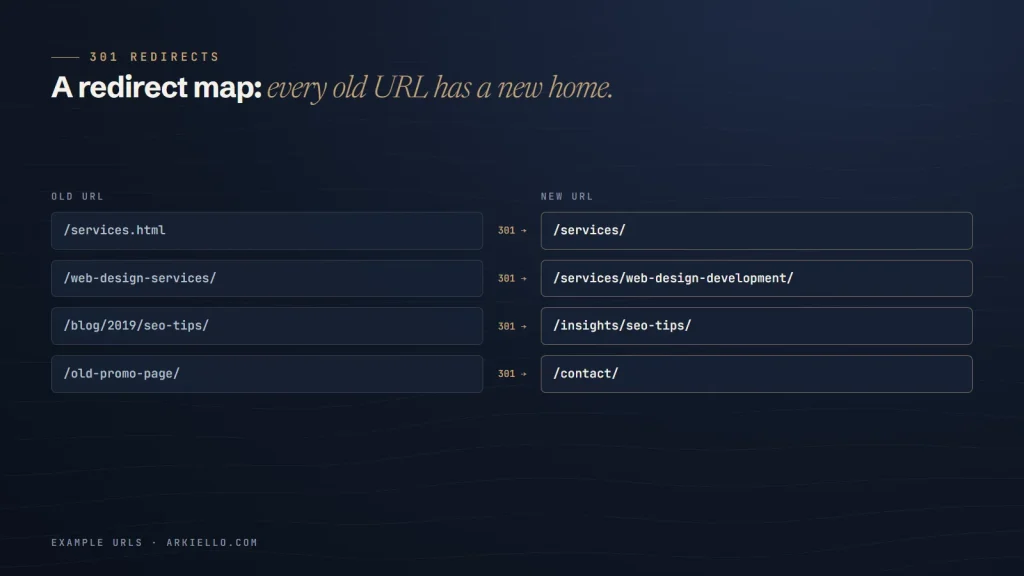
- Paste every current URL into the first column.
- List the new site’s URLs on a second sheet.
- Match each old URL to the new page that best answers the same need. Match by intent, not by similar wording.
- If there is no direct equivalent, choose the closest relevant parent page, such as the main services page or the relevant category.
- Mark the few URLs that genuinely have no replacement. If they have no traffic and no links, they can return a 404 or 410.
- Have someone else review the map before launch. Mistakes are much cheaper to fix in a spreadsheet than on a live site.
Rules for a clean redirect map
- One hop only. Old URL to final URL in a single redirect. Chains (A to B to C) waste crawl effort and slow visitors down.
- No loops. A redirect must never point back to itself, directly or through other redirects.
- Don’t send everything to the homepage. Redirecting many unrelated pages to the homepage frustrates visitors, and Google may treat those redirects as “soft 404” errors.
- Use patterns for large, predictable changes. If hundreds of blog posts move from /blog/2019/post-name/ to /insights/post-name/, one rule can handle them, as long as you test it.
- Update internal links too. Menus, footers and in-text links should point directly to the new URLs, not rely on redirects.
- Keep redirects for the long term. Google recommends keeping them for at least a year; we leave them in place indefinitely.
Where to add redirects on common platforms
- WordPress: an SEO plugin with a redirect manager (such as Rank Math) or a dedicated redirect plugin, or rules on the server for large sites.
- Wix: the URL Redirect Manager in the site’s SEO settings, which also accepts bulk imports.
- Squarespace: the URL Mappings setting, with one line per redirect in the form
/old-page -> /new-page 301. - Shopify: the URL redirects setting, which also supports CSV import.
- Sites behind Cloudflare: Bulk Redirects, or a redirects file on static hosting such as Cloudflare Pages.
Menu names change over time, so check your platform’s current help pages for the exact location.
How to test your redirects
Before and after launch, check that each old URL returns a single 301 status and lands on a working page. For a handful of URLs, a browser extension or an online HTTP status checker is enough. For larger sites, run your old URL list through a crawler in list mode and filter for anything that isn’t a single 301 followed by a 200.
After launch, watch the Pages report in Google Search Console for new “Not found (404)” errors. Each one is a URL that slipped through the map. Add a redirect and mark it fixed.
Want your redirects done right the first time?
Redirect mapping is built into every ARKIELLO website redesign. Not sure how risky your redesign is? Get a free redesign risk check.
For deeper crawl, indexing and speed work, see our technical SEO services.